Rabu, 20 Agustus 2008

Google Adsense Top Paying Keywords Article

Search Engine Tips For Budding Web Designers
By IC

Find the right keyword

Keywords – the words you think people will use to find your website and in turn buy your products. That’s what it’s all about! It all starts with finding the right keywords.

Find the best keywords using tools such as Wordtracker. You are looking for keywords / phrases that carry the most traffic (volume) and yet are still viable targets (KEI). In a nutshell, the words people use a lot and we can still get good results for.

KEI or Keyword Effectiveness Index is a measure of a keywords performance. It is a mathematical equation that compares the popularity of a keyword against it’s competition. The higher the value the higher your chances of getting a result.

KEI of less than 0.1 is not really viable. You would need to throw everything at this keyword to get results.

Competitors to that keyword?

Use a backlinks tool (there are loads on the internet to choose from) to research their link popularity. Gives some indication as to how many links are needed to get results.

No1 competitor HTML

Check their website code for keyword density, H1, H2, H3, Title tags etc, basically looking for any area we can improve.

2. Improve your HTML

Improve your HTML to be w3c valid, semantic mark-up, correct use of keyword rich tags; Title, H1,H2,H3 etc. Very importantly, take the time to write your own text content for your pages – don’t copy / paste your way to full content.

Search engines know if it’s found the exact text content elsewhere and may put your webpage in to it’s supplemental index as a result. Try getting pages out of there! Better to write your own good content to start with and get a friend to proof read it for typos etc.

Some HTML tips with SEO in mind:

Write a good meta tag description – put phone numbers at the end of this. Google uses this tag as the text for your listing IF you do not have a listing in DMOZ, in that case it takes the description from there.

Some people pick up the phone and dial numbers straight form the search results pages. You may not have had the click but you have had a customer call you.

Title tag - Write a keyword rich title tag, most important keywords first. 60 characters max.

Keywords tag – things have changed since the bad old days of spam SEOing. If you include a keywords tag it is good practice to only include words that appear in your body content. This tag is all but redundant now.

Write clean code. Link to external stylesheets and Javascript files. Use semantic mark-up. Your first few lines of code after the >
Powered by uarx.com
Loading...
tag should be a H1 tag (with your chosen keywords of course!) Why not follow this up with a sub heading H2 with even more keywords in?

Write good copy that reads well to a human and includes keywords for the search engines. Do not shoe horn keywords in or overdo it. The search engines are always looking for pages that work well for humans – NOT search engine robots. Maybe bold or italicise a paragraph (with keywords) this places a little more importance on those words.

If you have to have flash files or lots of images, use CSS positioning to place those div elements at the bottom of your code. Your code should be HTML light and text content heavy for best results. Good content as near to the top of your code as possible.

Navigation – Use text links, get a keyword in if you can but it’s not always possible. Always use absolute links with a title and not relative links.

Links to your homepage should always be to the domain name itself and not /index.html. If you don’t, the search engines will think you have two homepages – one at the domain name and one at mywebsite.co.uk/index.html. This will result in watered down pagerank for your homepage at the very least.

I like to add a keyword link at the very bottom of the HTML code too.

If you are targeting many keywords, write new pages with the above methods for each keyword page. No one page fix exists for all desired keywords.

SEO, search engine optimisation search engines, HTML and SEO, on page optinisation, off page optimisation

Search engine optimisation is a huge and complicated subject. This article is written to help those with an interest in the subject to understand a little more. There is also a few tips for the more practiced Search engine optimisation specialists.

Article Directory: http://www.articlecube.com

Benefits Of Earning Income Through Google AdWords And Eliminate Your Day Job Forever

Benefits Of Earning Income Through Google AdWords And Eliminate Your Day Job Forever

Google AdWords has diversified the extent of online marketing and advertising. They have become popular in recent times, since they offer a fast, easy, and inexpensive way of examining the ads and promos to be placed on the advertising sites.

They allow aspirants to drive traffic to their respective sites. Here, aspirants have the option to check different phrases in different Google AdWords and select the one they feel is appropriate. These tests are very beneficial, since they add the number of clients to the individual's web site.

Strong Benefits of Google AdWords:

1. Cost:

Google AdWords is cost-effective and grants flexibility in terms of deciding payment as CPC (Cost-Per-Click) or as CPM (Cost-Per-Impression). There are no constrains regarding minimum or maximum amounts. Thus, advertisers are free to decide the amount they will pay each person for visiting or clicking their ads. Marketers can also set maximum amount limits. Thus, if the amount limit on a particular day has been reached, Google AdWords will automatically stop the display of their ads.

2. Fast Income:

Immediately after creating a Google account, aspirants start producing their ads. Individuals require following a simple process of logging in, naming their campaign and providing a headline, content body and destination link. They can choose the keywords according to their convenience or refer to Google's keyword selection to select the most appropriate keywords or phrases.

3. Payment for Clicks:

This is a useful method of earning residual income for wannabes, who are willing to earn income merely by clicking on ads. However, Google software detects users clicking multiple numbers of times on same ads.

4. No Minimum Investment:

AdWords allow potential users to determine the cost of their campaign. Before AdWords came into existence, the process of buying an ad was highly expensive. However, Google AdWords do not set any limits for investment and advertiser can run the campaign for as low as $10 per day or lesser than that.

5. Other Benefits:

  • The marketers can stop the policy at any time.
  • AdWords target audience interested in specific products and accordingly display ads.
  • There is immediate implementation.
  • Google AdWords are accessible to 80% population of the USA and millions of other Internet users worldwide.

There you have 5 strong benefits of making money with AdWords and why you should begin doing so as soon as possible if you can! So many have already started and are quitting their jobs left and right.

Learn about Google AdWords and how to virtually rip-apart your competition with easy money making tips from expert marketer Chris Stigson. Download his simple instant cash products and start driving traffic immediately to make money from the internet, 100% passively!

Top 4 Pay Per Click Advertising Tips

Programs like Google AdWords and Yahoo Search Marketing can cost you a fortune with little to no return on investment if you do not know what you are doing. That is why I have put together a list of pay per click advertising tips that you can use as a reference for getting the most out of your campaigns.

First on our list of pay per click advertising tips is keyword selection. You might think that if your product or company is about working from home that this is the most logical keyword to bid on. However the more general the search term the higher the competition and thus the more you will have to pay in order to get your ad noticed. Finding long tail (three to four word) key phrases is often times a great way to get targeted ad exposure and to cut back your ad expenses.

You can use any keyword research tool to help find these long tail keywords. When you discover a potential search term go over to Google and see how many ads show up for the term. If there are two pages or less then this is a good sign. It may take some time but you can usually uncover hundreds of profitable keywords this way.

The second pay per click advertising tip to consider is your ad copy. Successful ads feature copy that makes the visitor want to click on their ad to learn more. Always be truthful with what the visitor is going to find when they click on your link. A great thing to consider putting in your ad is any benefits they might receive by what you are providing. Also create a sense of urgency. Phrases like "for a limited time" or "hurry before they are gone" will entice the visitor to check i out before it is to late.

Of course you will want to make sure your landing page corresponds with any said benefits or causes for urgency. I would even advise presenting the benefits described in your ad right away so as to keep their attention and hopeful get them to take action.

Another tip to help cut back on ad costs is to not always try and be the top ad for your keywords. I have found that often times people click on the first thing they see, almost as if it is a reflex, without really reading the ad throughly. These people will arrive on your page decide that it is not what they are looking for and immediately hit the back button. By shooting for an ad placement between 3 and 4 you can assure that whoever is visiting your site took the time to actively look around and read the ads on the page and chose yours because it seemed appealing.

My final pay per click advertising tip is to be mindful of what your competitors are doing. Identify who your competitors are and then devise a plan to monitor their search activities. Choose the top keywords that are bringing you the most targeted traffic and closely monitor them every day. If you notice they change their ad copy or landing page and you see a corresponding drop in traffic for yourself then take a look at what they are doing and decide to do it better.

There are no guarantees in the world of pay per click advertising, but with a little determination, effort, and the application of the pay per click advertising tips discussed above you should be able to maximize your return on investment.

In the last two years John Robert, through much trial and error and by studying many of the worlds top super affiliates has finally discovered the hidden secrets of pay per click advertising. You too can learn the secrets of a super affiliate by visiting "The Affiliate Conspiracy"

99 High Paying Keywords: The Secret Is Out!

Incorporating high paying keywords into your site is critical to maximizing your income. Who has the time to figure it all out? How much are you willing to pay for this type of information? The secret is out: Here are 99 keywords you can use with payouts averaging $2-$100 per click:

1. Structured settlements

2. Mesothelioma

3. Acne

4. Life Insurance

5. Death Insurance

6. Bextra

7. Asbestos

8. Car Insurance

9. Dental Plans

10. Private Jets

11. Debt Consolidation

12. Credit Cards

13. Rewards Cards

14. Equity Loans

15. Equity Line Credit

16. Loans

17. Mortgages

18. Pay Day Loans

19. Cash Advance

20. Bankruptcy

21. Reduce Debt

22. Refinance

23. Jet Charter

24. Vioxx

25. Wrongful death

26. Legal Advice

27. Taxes

28. Investing

29. Bonds

30. Online Trading

31. IRA Rollover

32. Refinance Quotes

33. Adult Education

34. Distance Learning

35. Alcohol Treatment

36. Rehab

37. Drug Rehab

38. Spyware

39. Cell Phone Plans

40. Calling Cards

41. VOIP

42. Weight Loss

43. Canadian Pharmacy

44. Depression

45. Spam Filter

46. Lasik

47. Facelift

48. Teeth Whitening

49. Annuity

50. Anti Virus Protection

51. Adult Diaper

52. Free Credit Report

53. Credit Score

54. Satellite

55. Anti Spam Software

56. Dedicated Hosting

57. Domain Name

58. Need Money

59. Bachelor Degree

60. Master Degree

61. Doctorate Degree

62. Work at Home

63. Quick Book

64. Extra Money

65. Eloan

66. Malpractice Lawyer

67. Lenox China

68. Cancer

69. Payperclick

70. Personal Injury Attorney

71. Lexington Law

72. Video Conferencing

73. Transfer Money

74. Windstar Cruise

75. Casinos Online

76. Term Life

77. Online Banking

78. Borrow Money

79. Low Interest Credit Cards

80. Personal Domain Name

81. Cellular Phone Rental

82. Internet Broker

83. Trans Union

84. Cheap Hosting

85. University Degrees Online

86. Online Marketing

87. Consolidate

88. Helpdesk Software

89. Web Host

90. Homeowner's Insurance

91. Yellow Page Advertising

92. Travel Insurance

93. Register Domain

94. Credit Counseling

95. Email Hosting

96. Business Credit

97. Consumer Credit

98. Blue Cross

99. Laptop Computer

Actual payouts vary depending on whose PPC program you belong to and on the amount that has been bid per click by advertisers. Still, the savvy web administrator will take good care to incorporate some of these key words and reap results higher than they ever expected.

Matt is the web administrator for the Aviation Employment Board at http://www.aviationemploymentboard.com and the Corporate Flight Attendant Community at http://www.corporateflyer.net and http://www.cabinmanagers.com

Sabtu, 02 Agustus 2008

Menampilkan Foto dengan Optimal

Menampilkan foto atau gambar di blog/web, jika tidak tepat ukurannya malah bisa mengganggu pengunjung. Misalnya ukuran kilobyte yang terlalu besar, tentu akan sulit diload.

Jadi sebelum foto atau gambar ditempel di web/blog, kita bisa melakukan optimasi terlebih dahulu terhadap gambar itu.

Bagaimana caranya? Dengan melakukan resize ukuran width dan height saja? Dengan resize lalu save saja tidak akan menghasilkan ukuran yang optimal. Kilobyte-nya biasa masih relatif besar walau ukuran panjang-lebarnya sudah dikurangi.

Cara yang akan dibahas adalah menggunakan software Adobe Photoshop (versi berapa aja bisa).

Contoh kali ini, kita ambil gambar yang berasal dari kamera digital. Biasanya jika menggunakan kamera yang bagus, maka hasil gambarnya akan sangat besar, bisa ratusan bahkan ribuan KB.
Kalau gambar seukuran itu langsung ditempel dalam postingan, wah bisa memberatkan pengunjung.

  1. Buka Adobe Photoshop, dan buka gambar/foto yang akan digunakan.

  2. Resize width dan height-nya dulu. Bagian ini bisa di-skip jika ukurannya tidak ingin diubah.
    Pada menu di Photoshop (atas) pilih 'Image', lalu 'Image Size'.
    Tentukan ukuran foto yang ingin ditampilkan. Kita hanya perlu menentukan width-nya saja, sedangkan nanti height nya akan berubah sendiri (menyesuaikan), tapi jangan hilangkan ceklist di bagian 'Constrain proportion' (lihat gambar, klik untuk memperbesar).

    Klik OK jika sudah.

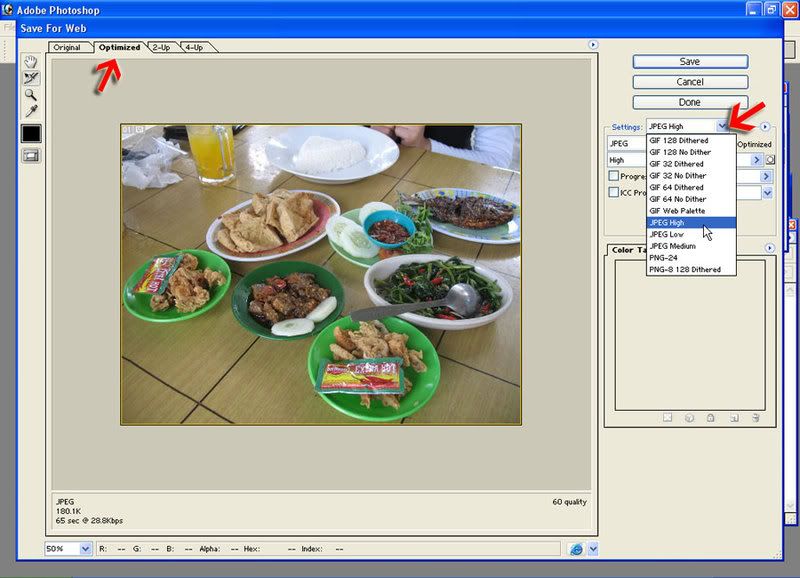
  3. Jika sudah, untuk menyimpannya, di menu atas pilih 'File' - 'Save For Web'.
    Akan muncul sebuah window box baru yang terdiri dari 2 kolom (kiri besar, kanan kecil).
    Di kolom kiri, pilih yang 'Optimized' (lihat gambar bwh, klik untuk memperbesar).
    Di kolom kanan, pilih bagian Setting, lalu coba saja mana yang paling cocok.
    Biasanya jika berupa gambar foto, kita bisa pilih JPG (High atau Medium).
    Tapi jika gambarnya berupa tulisan, kita bisa pilih yang GIF.
    Coba satu-satu kira2 mana yang menghasilkan gambar bagus (akan terdisplay di kolom kiri), jika sudah menentukan, SAVE.


Nah coba bandingkan ukuran kilobyte-nya jika kita langsung menampilkan saja. Tentu sangat jauh berbeda.

Memang mungkin kualitasnya tidak akan sebaik aslinya, tapi jika kita memilih settingan dengan benar maka hasilnya tidak akan jelek kok. Dan yang penting tetap bisa dinikmati pengunjung. :)

Lalu, jika kita menyimpannya dengan photobucket ataupun blogger, kita bisa menampilkan thumbnailnya saja, yang jika di klik baru akan menuju ke gambar besarnya. Seperti 2 gambar ilustrasi di atas.

tag and ping 1

Technorati bisa dibilang direktori blog, blogsearch, tags aggregator, piranti dan social bookmarking.
Walaupun sekarang orang banyak memakai Digg dan situs yang social bookmarking untuk menarik pengunjung dan backlink tidak berarti Technorati ditinggalkan.

Tag adalah keyword, tag adalah kata keyword yang menggambarkan post anda didalam satu perkataan. Untuk membuat keyword bisa diambil dari situs. Anda bisa membuat secara manual di fitur meta tag joomla, kalo mau gampang masukan meta Description trus klik yang saya tandai merah nanti muncul keyword
http://joomlapoweredsites.com/images/stories/untitled.jpg
cara kedua memakai cara otomatis (yang tidak mau repot)
1.component iJoomla Metatag Generator (rekomen)
http://www.ijoomla.com (pernah aku terangin) bisa juga memakain Open SEF
2. install plugin MetaTags NX (cuma agak ngaco)

Untuk menampilkan jangan lupa install plugin
J!Tags www.christopher-garvis.com (rekomen)
dsjtags http://www.bigdreams.ca
TagJ www.joomlaminas.org

Ping adalah perbuatan menghantar isyarat kepada website tertentu untuk memberitahu bahwa website/blog anda telah di update. Untuk joomla bisa memakai
1.J!Ping Component www.christopher-garvis.com (rekomen)
2.Weblog Pinger http://www.world.eu.org (beberapa server ping tapi automatis kalo nggak ada posting baru nggak bakal bisa ngping)

Sekarang coba deh nulis konten, lihat hasilnya. :D
ps. lihat http://technorati.com/posts/tag/Joomla ada situsku nggak ::)

tag and ping 2

Technorati bisa dibilang direktori blog, blogsearch, tags aggregator, piranti dan social bookmarking.
Walaupun sekarang orang banyak memakai Digg dan situs yang social bookmarking untuk menarik pengunjung dan backlink tidak berarti Technorati ditinggalkan.

Tag adalah keyword, tag adalah kata keyword yang menggambarkan post anda didalam satu perkataan. Untuk membuat keyword bisa diambil dari situs. Anda bisa membuat secara manual di fitur meta tag joomla, kalo mau gampang masukan meta Description trus klik yang saya tandai merah nanti muncul keyword
http://joomlapoweredsites.com/images/stories/untitled.jpg
cara kedua memakai cara otomatis (yang tidak mau repot)
1.component iJoomla Metatag Generator (rekomen)
http://www.ijoomla.com (pernah aku terangin) bisa juga memakain Open SEF
2. install plugin MetaTags NX (cuma agak ngaco)

Untuk menampilkan jangan lupa install plugin
J!Tags www.christopher-garvis.com (rekomen)
dsjtags http://www.bigdreams.ca
TagJ www.joomlaminas.org

Ping adalah perbuatan menghantar isyarat kepada website tertentu untuk memberitahu bahwa website/blog anda telah di update. Untuk joomla bisa memakai
1.J!Ping Component www.christopher-garvis.com (rekomen)
2.Weblog Pinger http://www.world.eu.org (beberapa server ping tapi automatis kalo nggak ada posting baru nggak bakal bisa ngping)

Sekarang coba deh nulis konten, lihat hasilnya. :D
ps. lihat http://technorati.com/posts/tag/Joomla ada situsku nggak ::)


om jomblo, gmn set auto tag n ping, jadi habis ngepost, langsung auto tag n ping, terima kasih banyak
nb : saya pake weblogpinger om jomblo

adsense - Google News